Synapex — Business Analysis & Data Analytics · Verify MBCS
13 — Build Report Pages
← Selected Subprocesses · Power BI Framework Overview
Purpose
This subprocess demonstrates how an approved report design is translated into implemented Power BI report pages using the validated semantic model and QA baseline established earlier in the delivery lifecycle.
The objective is not simply to place visuals on report pages. Page construction remains controlled by the approved business questions, KPI definitions, page hierarchy, visual standards, semantic-model capabilities, accessibility requirements and known validation constraints.
This creates a clear separation between report design and report implementation.
Process Diagram
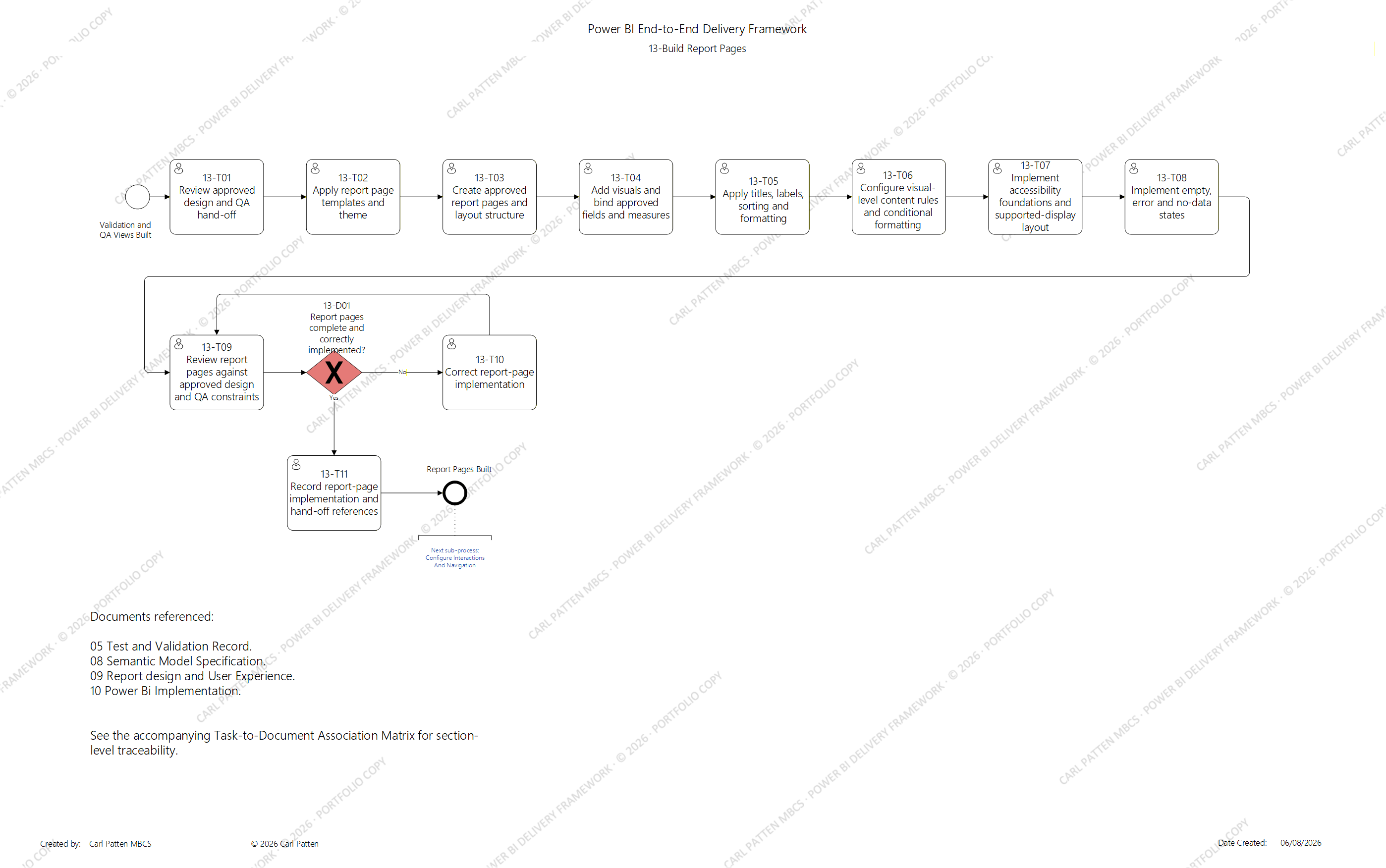
13 — Build Report Pages. Selected subprocess from the Power BI End-to-End Delivery Framework. © 2026 Carl Patten. Portfolio copy.
The editable process model is retained privately.
What This Demonstrates
This subprocess provides evidence of:
- implementation against an approved report-design baseline;
- use of validated semantic-model fields and measures;
- controlled report-page and layout construction;
- consistent application of reusable page templates and theme standards;
- deliberate visual selection based on business questions and KPIs;
- correct binding of authoritative fields and measures;
- controlled titles, labels, sorting and formatting;
- visual-level content and conditional-formatting rules;
- accessibility foundations;
- supported-display considerations;
- explicit empty, error and no-data behaviour;
- review against approved design and inherited QA constraints;
- remediation where implementation deviates from the approved design;
- recording of implementation evidence; and
- controlled hand-off into interaction and navigation configuration.
Process-to-Document Traceability
Report-page implementation consumes information from the approved Report Design and User Experience specification, the Semantic Model Specification and the existing validation baseline.
Implemented pages and visuals are then recorded in the Power BI Implementation artefact, while requirements and later validation references remain connected through the wider delivery documentation.
Selected Association Examples
13-T04 — Add Visuals and Bind Approved Fields and Measures
| Association | Document | Section(s) | Purpose |
|---|---|---|---|
| Input | 09 Report Design and User Experience |
09.9 Business Question and KPI Mapping09.11.1 Visual Selection Rules |
Supplies the approved relationship between the business question, KPI, report page and visual type. |
| Input | 08 Semantic Model Specification |
08.4 Table Grain and Table Roles08.6 Keys and Field Ownership08.11 Measure Catalogue08.13.2 Column and Measure Descriptions08.13.3 Formatting and Summarisation08.13.5 Hidden Fields |
Supplies the authoritative model objects, approved measures, grain, descriptions, formatting behaviour and report-author visibility rules. |
| Output | 10 Power BI Implementation |
10.8 Visual Inventory |
Records the implemented visual, page, visual type, bound fields or measures, static visual filters and requirement reference. |
| Conditional Output | 08 Semantic Model Specification |
08.11 Measure Catalogue08.12 DAX Documentation08.17 Validation References |
Updated only where an approved reusable measure must be added or changed to support the report visual. |
| Conditional Output | 10 Power BI Implementation |
10.9 Measures and Calculations |
Records implementation calculations introduced during page construction while the authoritative reusable semantic definition remains controlled within the Semantic Model Specification. |
This establishes that visuals should be driven by an approved business question and KPI, using authoritative semantic-model objects, rather than selecting fields or calculations opportunistically during report construction.
13-T09 — Review Report Pages Against Approved Design and QA Constraints
| Association | Document | Section(s) | Purpose |
|---|---|---|---|
| Input | 09 Report Design and User Experience |
09.7 Report Page Catalogue09.9 Business Question and KPI Mapping09.10 Page Layout and Visual Hierarchy09.11 Visual Design Standards09.16 Accessibility and Readability09.17 Device and Display Considerations09.18 Empty, Error and No-Data States09.19 Wireframes and Prototypes09.20 Requirements Traceability09.23 Design Review and Approval |
Supplies the approved design baseline against which the completed report pages are reviewed. |
| Input | 10 Power BI Implementation |
10.7 Report Page Inventory10.8 Visual Inventory10.9 Measures and Calculations10.10 Theme and Formatting Implementation10.15 Accessibility Implementation10.16 Empty, Error and No-Data Behaviour |
Supplies the report pages and static implementation components that have actually been built. |
| Input | 05 Test and Validation Record |
05.16 Discrepancy and Data-Quality Issue Register05.17 Resolution Record05.19 Regression-Test Baseline |
Supplies inherited QA findings, accepted resolutions and regression constraints that the report-page implementation must not invalidate. |
| Output | 10 Power BI Implementation |
10.21 Validation Evidence |
Records the developer implementation-review evidence without replacing later formal usability, accessibility or end-to-end validation. |
| Conditional Output | 10 Power BI Implementation |
10.19 Deviations from Approved Design10.20 Known Issues and Limitations |
Records implementation deviations, gaps or limitations identified during the review where applicable. |
This creates an explicit comparison between approved design, implemented result and existing QA evidence, rather than treating visual completion as proof that the page has been correctly implemented.
13-T11 — Record Report-Page Implementation and Hand-Off References
| Association | Document | Section(s) | Purpose |
|---|---|---|---|
| Output | 10 Power BI Implementation |
10.4 Implementation Summary10.7 Report Page Inventory10.8 Visual Inventory10.9 Measures and Calculations10.10 Theme and Formatting Implementation10.15 Accessibility Implementation10.16 Empty, Error and No-Data Behaviour10.21 Validation Evidence10.23 Revision History |
Baselines the completed report-page implementation and records the applicable implementation version and evidence references. |
| Output | 09 Report Design and User Experience |
09.20 Requirements Traceability |
Updates the design traceability record with the implemented report-page and visual identifiers. |
| Output | 05 Test and Validation Record |
05.3 Validation Scope05.6 Validation Scenario Register05.7 Expected Results Register |
Adds or confirms the later validation coverage required for report visuals, accessibility, display behaviour and empty, error or no-data states. |
This ensures the completed report pages do not simply become an undocumented state inside the Power BI file. Their implementation is baselined, traceability is updated and the required later validation is explicitly carried forward.
These are representative associations only. The complete subprocess maintains task-level input and output associations across all report-page implementation activities and is retained as part of the private framework.
Relationship to the End-to-End Framework
Build Report Pages follows:
12 — Build Validation and QA Views
The implementation therefore inherits validated model behaviour, QA evidence, identified discrepancies and the regression baseline established before production-facing report pages are completed.
The subprocess produces the implemented static report pages required by:
14 — Configure Interactions and Navigation
This separation allows the framework to distinguish between:
what appears on a report page
and
how the user subsequently interacts with and moves through the report.
Filters, slicers, cross-visual interactions, navigation, bookmarks, drill-through and tooltip behaviour can therefore be configured and validated as a controlled subsequent activity rather than becoming inseparable from initial page construction.
Design Principles
The subprocess applies several principles intended to maintain alignment between business need, approved design and implemented reporting:
- implement against the approved report design rather than redesigning during build;
- use authoritative semantic-model fields and approved measures;
- map visuals to defined business questions or KPIs;
- retain consistent visual hierarchy and formatting;
- apply accessibility considerations during construction rather than retrospectively;
- define behaviour for blank, unavailable or no-data states;
- record implementation deviations explicitly;
- distinguish implementation review from independent later validation; and
- maintain traceability from requirements and design through to implemented pages and validation evidence.
Portfolio Evidence Boundary
This page presents selected evidence sufficient to demonstrate the controlled report-page implementation approach and its relationship to report design, semantic modelling and validation.
The following remain private:
- editable process-model source;
- complete task-to-document association data;
- reusable Report Design and User Experience template;
- reusable Power BI Implementation template;
- complete visual and report-page inventories;
- detailed implementation guidance; and
- project-specific Power BI report implementations.
← Previous Selected Example: 07 — Define the Semantic Model → · Selected Subprocesses · Next Selected Example: 18 — Perform End-to-End Source-to-Report Testing →
© 2026 Carl Patten. All rights reserved.