Synapex — Business Analysis & Data Analytics · Verify MBCS
Solution Architecture
← Business Problem & Requirements · Project Overview · Data Preparation →
Overview
The solution architecture translates the business requirements into a controlled data flow from Azure DevOps through data preparation and semantic modelling to Power BI reporting.
A hybrid extraction approach was used because no single Azure DevOps source provided all of the information required by the reporting model.
Architecture Approach
The solution combines two Azure DevOps data-access methods:
- Azure DevOps Analytics View provides historical work-item snapshots used to reconstruct approval history and determine the current continuous approval period.
- WIQL and the Azure DevOps REST API provide targeted current-state enrichment, including the information required to assess Description and Acceptance Criteria completeness.
The data is then transformed in Power Query, loaded into a controlled semantic model and exposed through the Power BI report layer.
This approach allows historical approval analysis and current requirements-health assessment to coexist without loading unnecessary source content into the final report-facing model.
Source-to-Report Data Flow
The implemented data flow is:
Azure DevOps Boards
↓
Analytics View — historical approval snapshots
WIQL + REST API — current work-item enrichment
↓
Power Query — cleansing, transformation and current-state preparation
↓
Power BI Semantic Model — relationships, classifications and DAX measures
↓
Power BI Report — executive, analytical and operational views
The report is implemented in Import mode and refreshed manually in Power BI Desktop for the portfolio environment.
Principal Solution Components
| Component | Responsibility |
|---|---|
| Azure DevOps Boards | Source work items, approval fields, hierarchy and controlled test scenarios |
| Azure DevOps Analytics View | Historical daily approval-state data |
| WIQL | Identifies the current work-item population required for targeted enrichment |
| Azure DevOps REST API | Retrieves current fields required for requirements-completeness assessment |
| Power Query | Cleans, transforms and combines source data; derives current-state and approval-period structures |
| Semantic Model | Provides current, historical, approval-period and requirements-health analytical structures |
| DAX | Implements dynamic KPIs, approval-age calculations, health measures and executive reporting logic |
| Power BI Report Layer | Presents Executive Governance Overview, Approval Governance Summary, Overdue Approval Exceptions and Requirements Health |
| Validation Layer | Supports source-to-report reconciliation, controlled scenario testing and model validation |
Key Architectural Decisions
Separate Historical and Current-State Data
Historical approval snapshots contain multiple records for each User Story, while current reporting requires one deterministic row per User Story.
The solution therefore separates:
ApprovalHistory— historical daily snapshots; andCurrentApprovals— one current row per User Story.
This prevents historical records from multiplying current KPI counts while retaining the history needed to reconstruct approval periods.
Targeted API Enrichment
Description and Acceptance Criteria are required to determine requirements completeness, but retaining the full long-text content in the analytical model was unnecessary.
The REST API is therefore used to derive Boolean completeness indicators rather than loading the raw requirement text into the report-facing model.
This reduces model cardinality and limits unnecessary exposure of source content.
Separate Requirements-Health Issue Grain
A single User Story can have several health issues.
Story-level health status is therefore maintained separately from RequirementsHealthReasons, which stores one row per individual issue reason.
This allows the solution to report both:
- the number of affected User Stories; and
- the total number and distribution of individual issues.
Controlled Helper Objects
Disconnected helper structures are used where a physical relationship would add unnecessary model complexity.
For example:
FeatureWorkItemIDsvalidates whether a parent work item is a valid Feature; andExecutive Exception Typesupplies the controlled category axis for the Executive material-exception visual.
Project Evidence
Implemented Solution Architecture
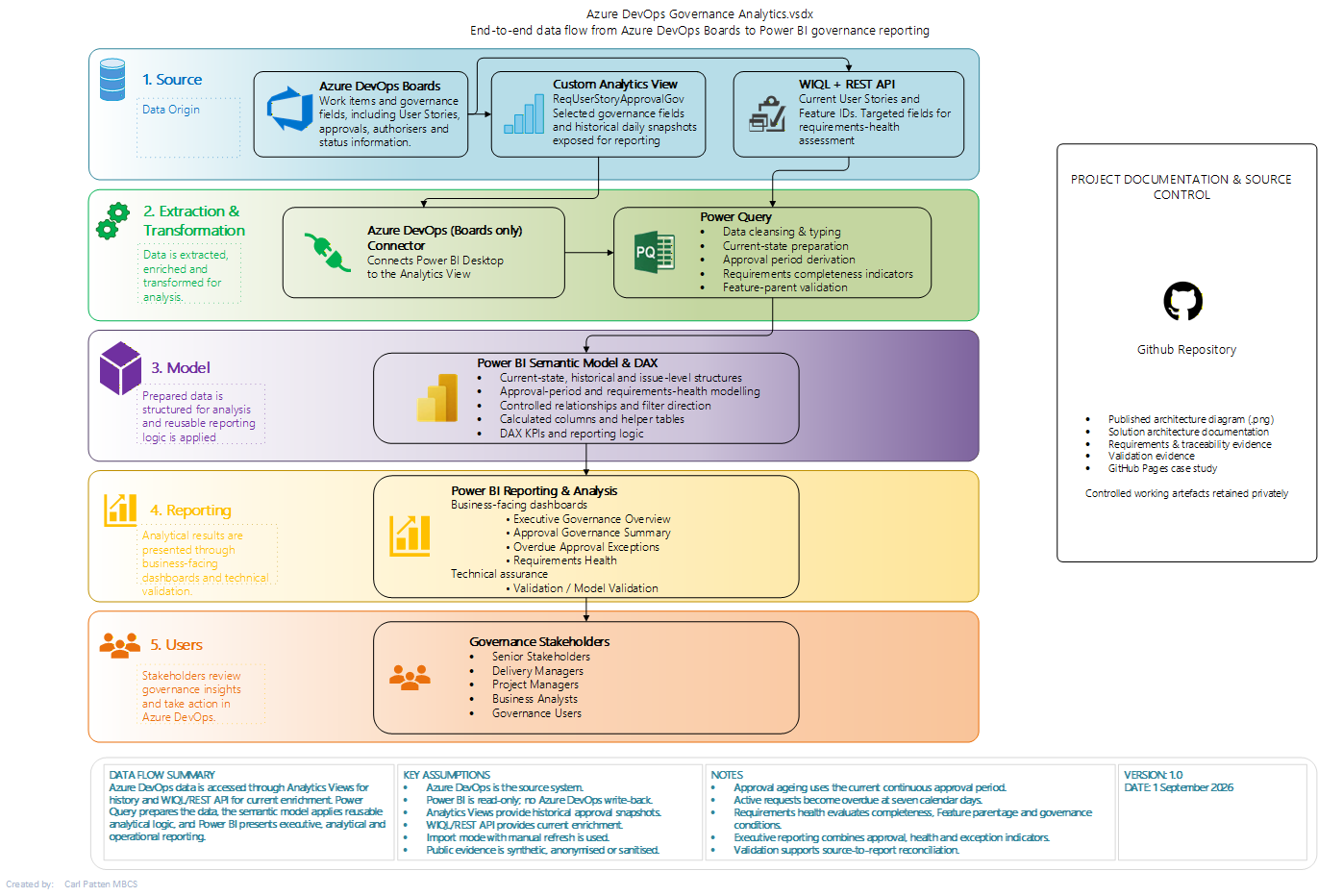
Solution architecture showing the implemented flow from Azure DevOps through historical and current-state extraction, Power Query transformation, semantic modelling and Power BI reporting.
What this demonstrates:
The source design was driven by the analytical requirements rather than by a single preferred extraction method. Historical approval analysis is provided through Azure DevOps Analytics Views, while WIQL and the REST API provide targeted current-state enrichment required for requirements-health assessment.
Architecture Decision Evidence
| Design Requirement | Architectural Response |
|---|---|
| Historical approval behaviour was required | Daily Azure DevOps Analytics View snapshots retained through ApprovalHistory |
| Current reporting required one row per User Story | Separate CurrentApprovals structure created |
| Description and Acceptance Criteria completeness had to be assessed | Current work items enriched through WIQL and the Azure DevOps REST API |
| Raw long-text requirement content was unnecessary for reporting | Boolean completeness indicators retained instead of full text |
| A User Story could have multiple health issues | Separate issue-grain RequirementsHealthReasons structure implemented |
| Valid Feature parentage had to be checked | Disconnected FeatureWorkItemIDs helper structure used |
| Executive exception categories required a controlled axis | Disconnected Executive Exception Type presentation helper used |
| KPI results had to reconcile to detailed records | Validation layer retained alongside the business-facing reporting pages |
What this demonstrates:
Each principal architectural component exists to satisfy a specific reporting, data-quality or validation requirement. The model structure was therefore a consequence of the business and analytical rules rather than an arbitrary Power BI design.
Security and Privacy Considerations
The portfolio architecture deliberately separates public evidence from working implementation artefacts.
Controls include:
- synthetic or anonymised portfolio data;
- exclusion of credentials and tenant-specific configuration;
- sanitised screenshots and documentation;
- exclusion of unnecessary raw Description and Acceptance Criteria text from the report-facing model; and
- retention of working Power BI and source artefacts outside the public portfolio.
Architecture Outcome
The resulting architecture provides a compact analytical model capable of supporting:
- current approval-governance reporting;
- seven-day overdue approval identification;
- approval-period and approval-age analysis;
- objective requirements-health classification;
- individual health-reason analysis;
- executive governance reporting; and
- controlled KPI-to-detail reconciliation.
The design also demonstrates how different Azure DevOps interfaces can be combined when historical and current-state reporting requirements cannot be satisfied efficiently from a single source.
Evidence Presented
The public case study presents selected evidence of:
- the implemented high-level solution architecture;
- source-to-report data flow;
- Azure DevOps Analytics View and REST API integration;
- semantic-model design decisions;
- separation of historical, current-state and issue-grain data;
- data-minimisation and privacy controls; and
- validation considerations incorporated into the architecture.
The published architecture diagram is a flattened, watermarked portfolio representation. Editable architecture artefacts and working implementation files are retained within the controlled project environment.
← Business Problem & Requirements · Project Overview · Data Preparation →
© 2026 Carl Patten. All rights reserved.